EHR Features
Smart Learning
When it comes to selecting an EMR or EHR, dermatologists have one common goal: a process that makes dermatology electronic medical records easy. That’s why you’ll love eDerm’s Smart Learning™ feature – it simplifies the learning curve. You don’t have to learn how it works. It takes its cues from you.
Here are some of the key features that make eDerm so easy to work with:
Save As Default
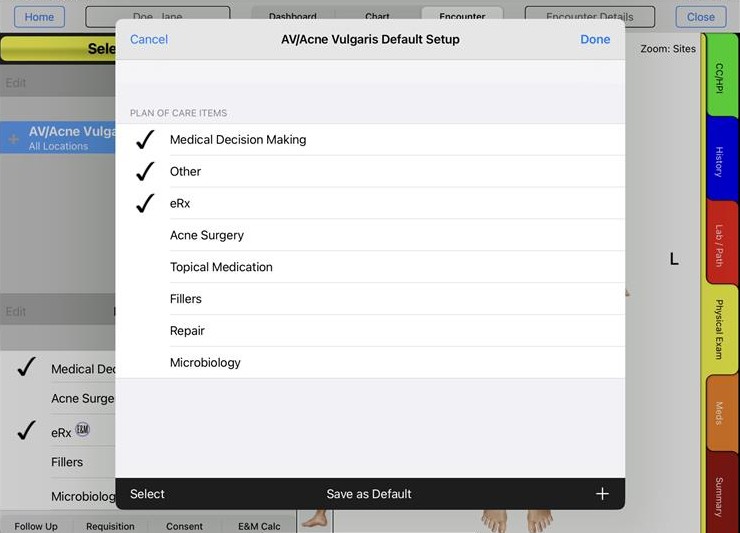
Throughout the eDerm app, this feature lets you set up commonly used information fields for which you will use the same information about 80 percent of the time. Some examples are Procedure Preparation, Suture Types and Materials, Repair Types, Patient Instructions, etc. For these recurring fields, you’ll see a Save as Default feature that allows eDerm to learn the information in that field and use it as your default information for new entries. Most of the time you will not have to re-enter the information. And for the small percentage of cases where the information must be altered, you can simply edit the text in this field. This feature will simplify your encounters and save you a great deal of time.
Impression Setup
Our iPad app also lets you configure the impressions that you see most often in the same areas and treat the same way. That allows eDerm to preset the locations and plans of care for each impression so charting can be done quickly.
Remember Fields
With our EHR dermatologists have the ability to set up fields where eDerm will remember their values. This feature is also a timesaver. For instance, you can use the Remember fields feature for prescription details. Once you set the quantity, signature and refills for a prescription, our app automatically remembers them (without using the Save as Default function).
List Adds and Edits
You have the ability to add and edit lists throughout the eDerm app. eDerm will learn how you organize and maintain these lists so that each time you use a list the items in that list will appear as you last edited them. With this customization feature, the items that are most important to you will always appear exactly as you prefer them. These features will revolutionize your dermatology electronic medical records, helping you to always work faster and smarter.
Smart Coding
Built-In Billing Expertise
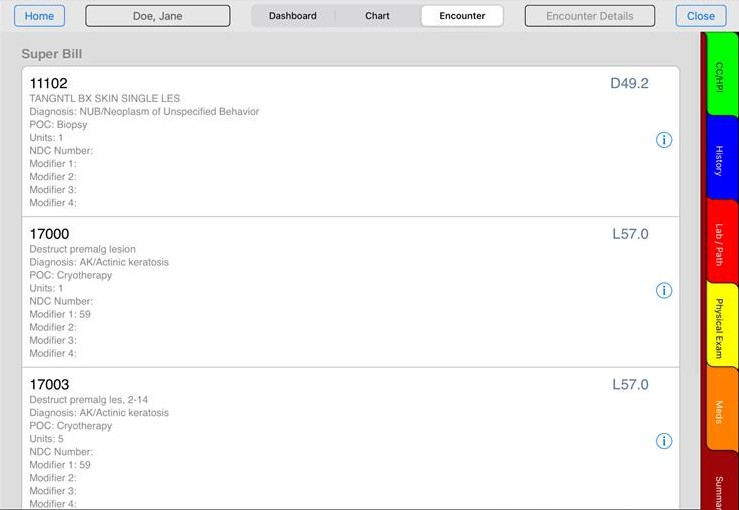
eDerm has the built-in billing expertise to code correctly while maximizing practice efficiency and profitability. No more under-coding or over-coding. Your documentation automatically and seamlessly supports your billing and generates the Super-Bill with E&M and CPT/ICD9/ICD10 codes.
E&M Calculator
Super Bill
Impression Details
CPT Coding
One-Touch Charting
eDerm Streamlines Impressions
eDerm is all about simplifying your dermatology electronic medical records. With the eDerm Smart Learning™ feature, when you select an impression and it is documented along with the plan of care in the visit note.This revolutionary EHR app for dermatologists is all about simplifying and streamlining the encounter for greater speed, accuracy and simplicity. The following features will do just that when you select an impression.
Automatic Location Selection
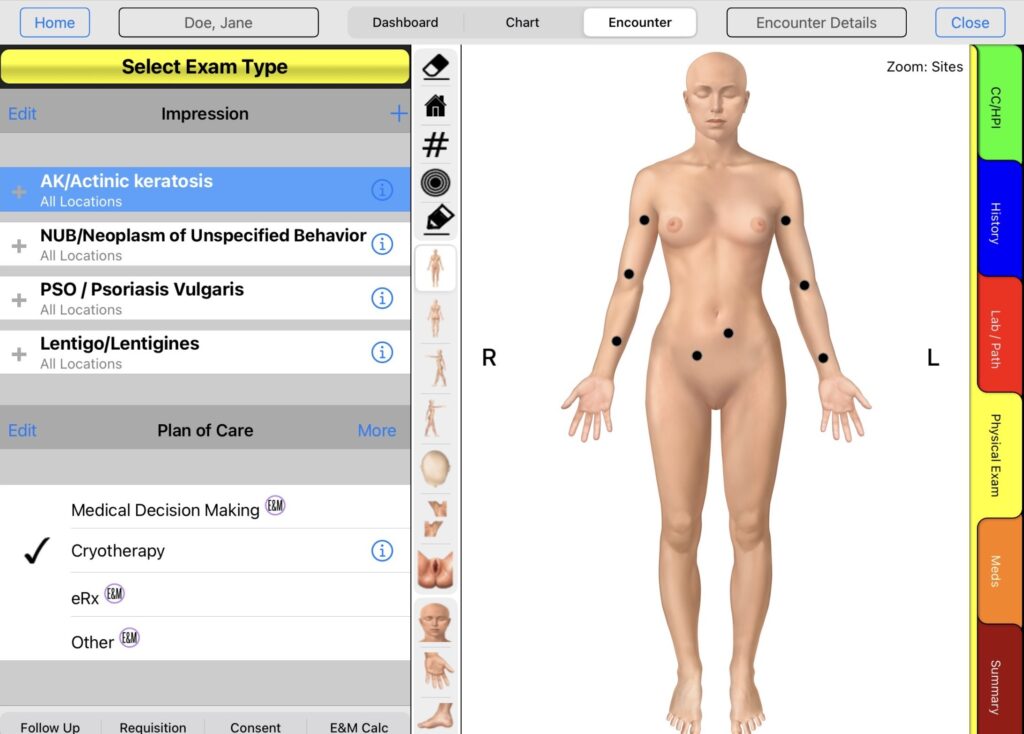
Smart Learning™ allows you to eliminate unnecessary steps, so it allows you to automatically associate a location with a specific impression. For example, you may “teach” eDerm to always select the face as the location for acne. So every time the “acne” diagnosis is selected it automatically defaults to the face as the location.
Automatic Plan of Care Selection
The same automatic association can be made between the impression and the plan of care. For example, actinic keratosis is almost always treated with cryotherapy (destruction by freezing). If you use Save as Default for the cryotherapy POC, all you have to do when treating a patient with this impression is to select the locations for treatment. Everything else is automatically done for you.
Automatic Impression Details
eDerm’s Save as Default feature simplifies everything from descriptors to differential diagnosis (DDX) and patient instructions. You simply select the impression and the impression details will already be documented and patient instructions are ready to print. It’s that simple!
Visit Note
The Visit Note will be automatically created as you select impression and treat with plan of care. No additional typing or changes are required.
Biopsies
When you select biopsies, the requisition is automatically created. When the biopsy is ready, the practice can print the requisition with labels instead of writing the information by hand.
Dermatology Knowledge Base
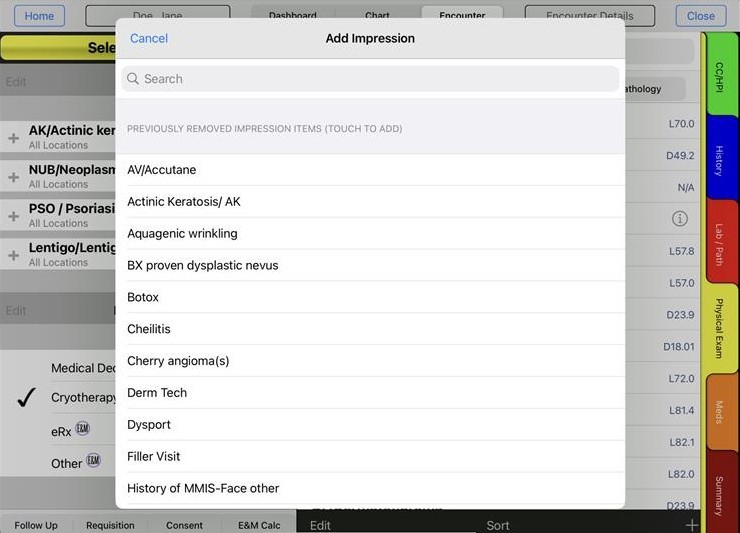
eDerm has all the features you need in a dermatology EHR – and nothing extra that you don’t need, so it’s easy to learn and easy to use. eDerm makes dermatology electronic medical records simple with a complete dermatological library and the dermatology workflow to make every encounter quicker and more efficient than ever before.
Patient Education
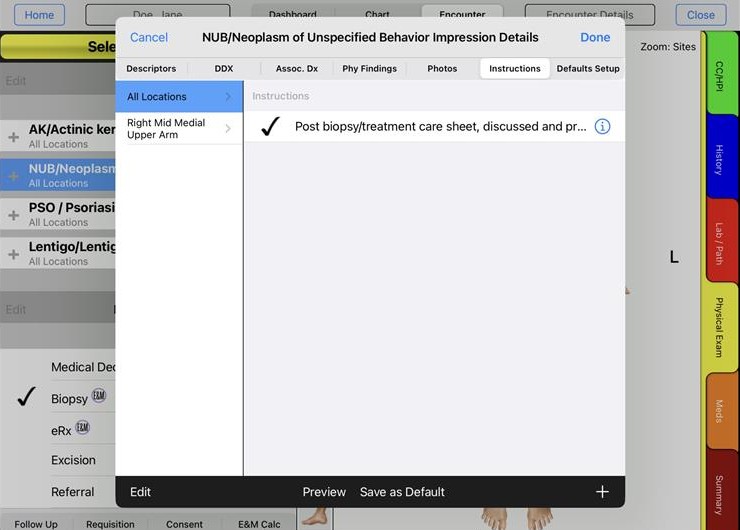
The application has a Patient Instruction area for all impressions/POCs. The Patient Instructions may be shared across the impressions/POCs, or be specific to a single impression/POC. Patient Instructions may also be defaulted for impression/POC. In the summary, all Patient Instructions are brought into a single document for easy printing. The instructions may also be printed directly from any of the impressions.
POCs. In addition to these comments, the topics of follow up instructions, return appointments and continued plan of care are still relevant.
Dashboard
A Better Bedside Manner
When it comes to selecting an EMR or EHR, dermatologists have one common goal: a process that makes dermatology electronic medical records easy. That’s why you’ll love eDerm’s Smart Learning™ feature – it simplifies the learning curve. You don’t have to learn how it works. It takes its cues from you.
Here are some of the key features that make eDerm so easy to work with:
Save As Default
Throughout the eDerm app, this feature lets you set up commonly used information fields for which you will use the same information about 80 percent of the time. Some examples are Procedure Preparation, Suture Types and Materials, Repair Types, Patient Instructions, etc. For these recurring fields, you’ll see a Save as Default feature that allows eDerm to learn the information in that field and use it as your default information for new entries. Most of the time you will not have to re-enter the information. And for the small percentage of cases where the information must be altered, you can simply edit the text in this field. This feature will simplify your encounters and save you a great deal of time.
Impression Setup
Our iPad app also lets you configure the impressions that you see most often in the same areas and treat the same way. That allows eDerm to preset the locations and plans of care for each impression so charting can be done quickly.
Remember Fields
With our EMR dermatologists have the ability to set up fields where eDerm will remember their values. This feature is also a timesaver. For instance, you can use the Remember fields feature for prescription details. Once you set the quantity, signature and refills for a prescription, our app automatically remembers them (without using the Save as Default function).
List Adds and Edits
You have the ability to add and edit lists throughout the eDerm app. eDerm will learn how you organize and maintain these lists so that each time you use a list the items in that list will appear as you last edited them. With this customization feature, the items that are most important to you will always appear exactly as you prefer them. These features will revolutionize your dermatology electronic medical records, helping you to always work faster and smarter.
Physical Exam
Easy Does It!
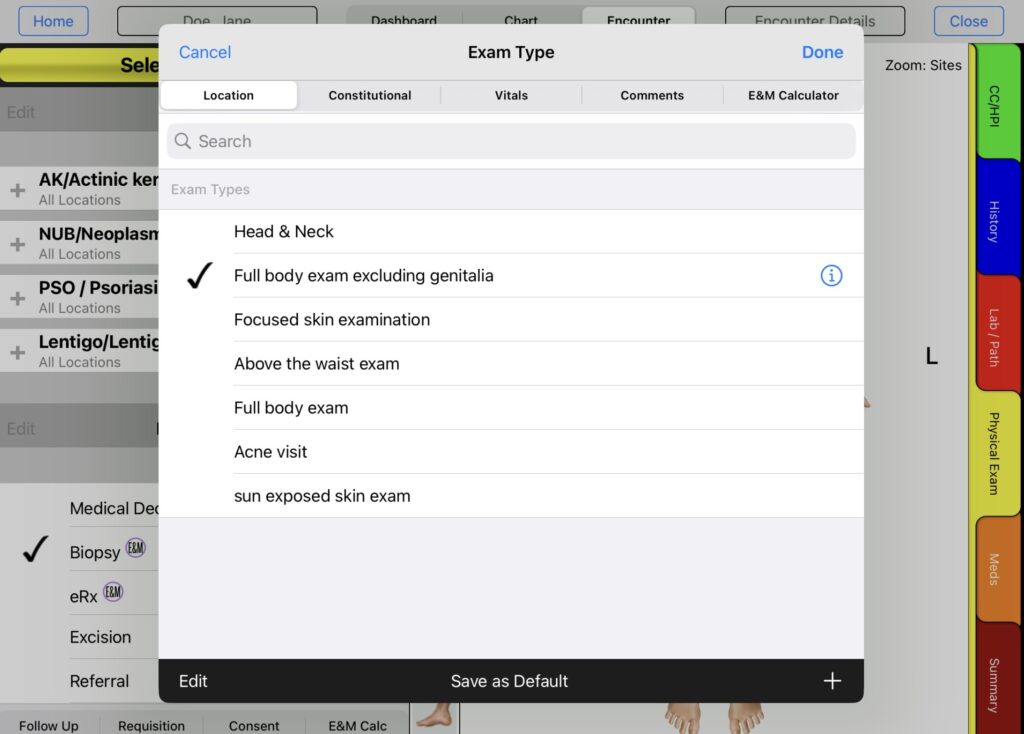
eDerm makes documenting your patient’s physical exam easier than ever. Bring patient histories forward from past visits. Search and sort biopsy log by patient, disease, lab, date, pathology status (pending/received) and treated/untreated cancers. There’s no need to re-key information or perform repetitive tasks. During the exam, eDerm automatically associates the information you enter to every step of the process, so you won’t need to enter it again.
eDerm keeps an active problem list of each patient including plan of care and work completed during previous visits – and past work can easily be copied into the current visit. It’s the easiest way to manage a comprehensive care plan for patients.
E&M Calculator
Super Bill
Impression Details
CPT Coding
Photos
A Picture Is Worth a Thousand Words
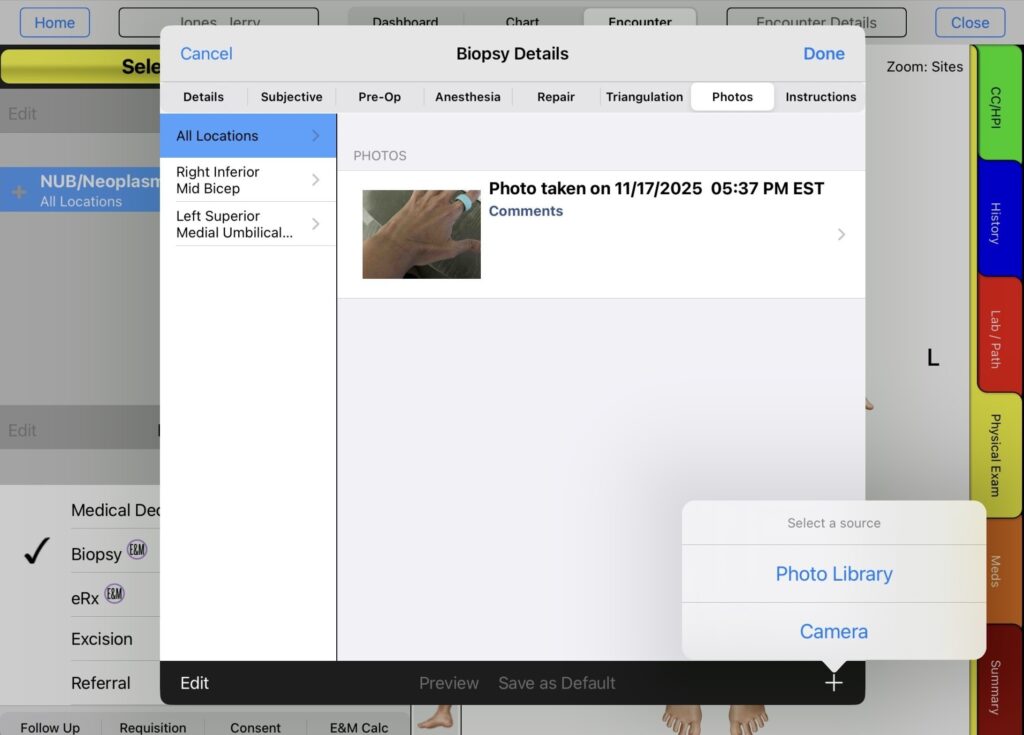
Wouldn’t it be great if your EHR could make automatic contextual connections between photos of your patient’s treatment areas and their patient record and plan of care? eDerm can – and it is the only app that does this! Throughout the exam, just use your iPad to photograph problem. The application supports unlimited picture taking. Photos are associated with their Impression or POC and are automatically documented to the Impression or POC. Comments may be added to photos. Photos automatically go to the Visit Note and Patient Chart for later reference.
When it comes to selecting an EMR or EHR, dermatologists have one common goal: a process that makes dermatology electronic medical records easy. That’s why you’ll love eDerm’s Smart Learning™ feature – it simplifies the learning curve. You don’t have to learn how it works. It takes its cues from you.
Here are some of the key features that make eDerm so easy to work with:
Save As Default
Throughout the eDerm app, this feature lets you set up commonly used information fields for which you will use the same information about 80 percent of the time. Some examples are Procedure Preparation, Suture Types and Materials, Repair Types, Patient Instructions, etc. For these recurring fields, you’ll see a Save as Default feature that allows eDerm to learn the information in that field and use it as your default information for new entries. Most of the time you will not have to re-enter the information. And for the small percentage of cases where the information must be altered, you can simply edit the text in this field. This feature will simplify your encounters and save you a great deal of time.
Impression Setup
Our iPad app also lets you configure the impressions that you see most often in the same areas and treat the same way. That allows eDerm to preset the locations and plans of care for each impression so charting can be done quickly.
Remember Fields
With our EMR dermatologists have the ability to set up fields where eDerm will remember their values. This feature is also a timesaver. For instance, you can use the Remember fields feature for prescription details. Once you set the quantity, signature and refills for a prescription, our app automatically remembers them (without using the Save as Default function).
List Adds and Edits
You have the ability to add and edit lists throughout the eDerm app. eDerm will learn how you organize and maintain these lists so that each time you use a list the items in that list will appear as you last edited them. With this customization feature, the items that are most important to you will always appear exactly as you prefer them. These features will revolutionize your dermatology electronic medical records, helping you to always work faster and smarter.
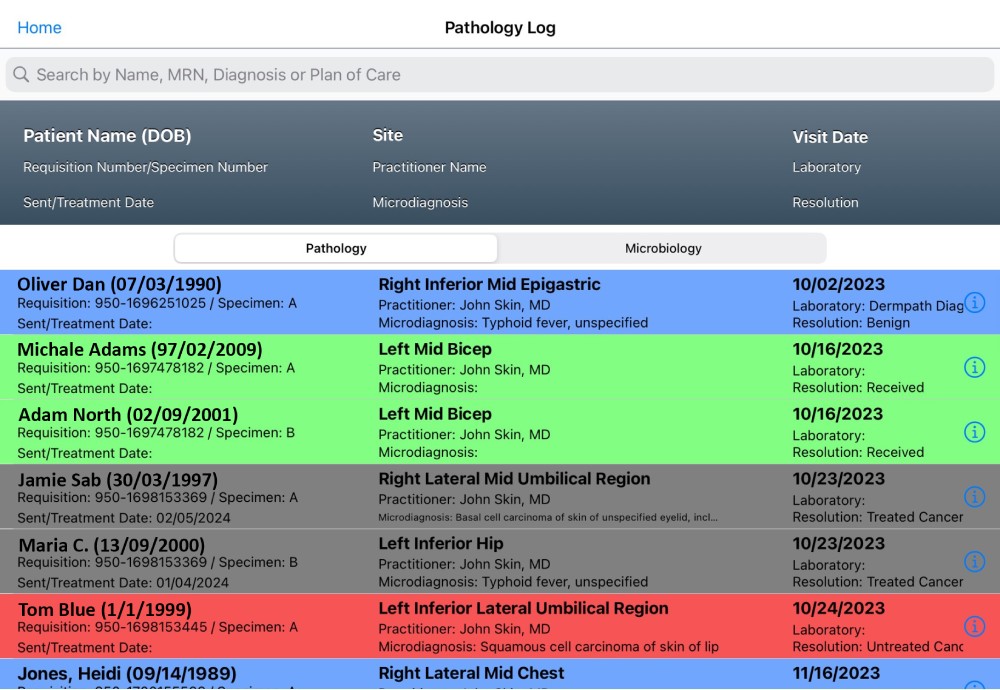
Pathology Life Cycle
eDerm Automatically Tracks Patients with Untreated Cancer
- Biopsy
- Order
- Neoplasm of uncertain behavior diagnosis
- Result
There are several color-coded pathology logs to help with quick visibility into analysis.
E&M Calculator
Super Bill
Impression Details
CPT Coding
Patient Chart
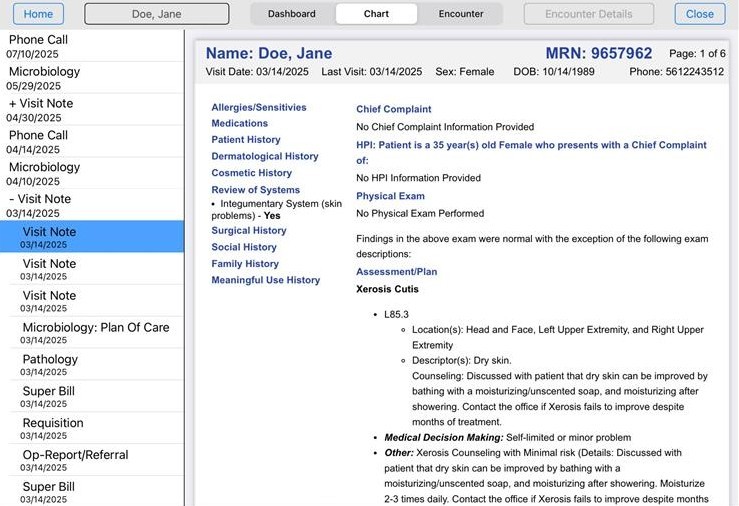
Both the web application and iPad application allow you to view visit note, addendums, pathology, operational reports, blood work, cultures, medical records, prescriptions, miscellaneous procedures, skin cancers, cryos, biopsies, letters, body images, patient comments, instructions, biopsy log, consents, disease dictionary and phone messages.
Scanning
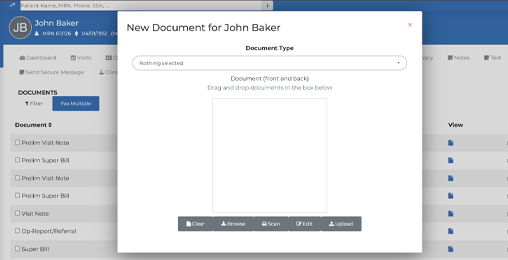
With eDerm’s scanning feature, you can make any paper document part of your patient’s electronic file. Simply scan the document and save it in a digital format (PDF or image file). Then, use the application scan management feature to upload the digital file to the patient’s chart or pathology log.